Looking for a simple way to save a YouTube Short for offline access or a project you are allowed to use? A YT Shorts Downloader lets you start with a Shorts link, check the options returned by the tool, and save a supported file to your device. The usual workflow is simple: open the Short, copy its link, paste the URL into the downloader, and choose from the available options.
Downloading a video does not automatically grant permission to reuse it. YouTube provides official downloads for your own uploads and offline viewing with Premium in supported situations. For other videos, check the creator’s permission, YouTube’s terms, and the applicable law. This guide explains how a YT Shorts Downloader works and covers device support, quality, safety, and copyright.
How to Use a YT Shorts Downloader
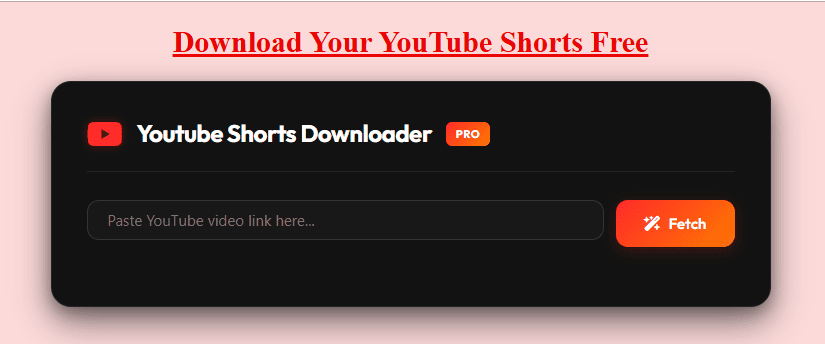
The quickest way to start is to use the YouTube Shorts Downloader on YTVideosDownloader.pro. Keep the original link intact and choose only from the format and quality options that the tool actually displays.
- Open YouTube Shorts. Find the Short you want to save and make sure it plays normally in YouTube.
- Copy the Shorts link. On a phone, tap Share and select Copy link. On a computer, copy the address from the browser or use YouTube’s share option.
- Open the downloader. Visit the tool page in your browser. You should not need to install an unrelated application just to paste a link into a browser-based tool.
- Paste the full URL. Check that the complete link appears in the input field and that no characters are missing.
- Fetch the available options. The service may return supported formats, resolutions, or file information. Those choices can vary from one video to another.
- Select an option and save. Choose the option suitable for your device and purpose, then follow your browser’s download prompt.
- Check the downloaded file. Open the Downloads area in your browser or device and confirm the file plays as expected.
For the most reliable workflow, treat the YT Shorts Downloader as a link processor, not a promise that every video can be saved. A typical Shorts URL includes youtube.com/shorts/ followed by a video identifier. Some Shorts may also open through other YouTube link formats. The safest approach is to copy the link directly from YouTube rather than editing or guessing the video ID yourself.
What Is a YT Shorts Downloader?
A YT Shorts Downloader is a web-based tool that processes a Shorts URL and, when supported, presents options for saving a video file. A browser tool can be convenient because it may work without a dedicated desktop program. The exact capabilities, supported URLs, quality choices, limits, and privacy practices depend on the service.
YouTube Shorts are short-form videos that appear in the Shorts experience. YouTube says eligible square or vertical videos uploaded from October 15, 2024 can be categorized as Shorts when they are up to three minutes long. The detailed eligibility rules are available in YouTube’s official three-minute Shorts guidance. Not every video that looks vertical will necessarily behave the same way in every downloader, so check the actual URL and results.
People use a Shorts downloader for different reasons, from backing up their own uploads to reviewing authorised educational clips or researching content styles. The intended use matters: saving a video for reference is different from reposting it or using its music commercially.
YT Shorts Downloader on Android, iPhone, and Desktop
A browser-based workflow can be similar across devices, but the final save location varies by operating system, browser, and settings.
YT Shorts Downloader on Android
Open the Short in the YouTube app, tap Share, and copy the link. Open the downloader in your mobile browser, paste the URL, and check the options returned. When you save a file, look in the browser’s Downloads list or your phone’s Downloads folder. If the file does not appear, check the browser’s download history before repeating the process.
If the YT Shorts Downloader returns several options, choose from the listed resolutions rather than looking for a setting the service does not provide. Avoid unfamiliar APK files and unnecessary permissions. Never give your Google password to an unrelated website.
YT Shorts Downloader on iPhone or iPad
Copy the Short’s link from YouTube and open the tool page in a supported browser. Paste the link and follow the browser’s download flow if a compatible file is offered. Then check the browser’s download manager or the Downloads folder in the Files app. Depending on your browser and file type, a saved video may not automatically appear in Photos, so use the available save or share option if you need it there.
If a site asks you to install a configuration profile or unknown extension, stop and review the request. Do not expose account credentials.
Using the tool on Windows, Mac, or Chromebook
Copy the Shorts URL from your browser, open the downloader in another tab, and paste the complete link into its input box. If the tool returns a downloadable option, select it and follow the browser prompt. The file usually goes to your default Downloads folder unless you have changed the browser setting.
If a file does not open, check its extension and use a trusted media player. Delete unexpected executable files and avoid installing extensions when you expected a video.
What Video Quality and Formats Can You Expect?
A YT Shorts Downloader should show the options it can actually retrieve rather than promising every resolution for every clip. Quality depends on the original upload and the options that the service can retrieve. Some tools show resolution choices such as 360p, 480p, 720p, or 1080p, but those options are not guaranteed for every Short. A tool cannot restore detail that is missing from a low-resolution source, and changing a file’s dimensions does not create genuine additional quality.
MP4 video
MP4 is a commonly supported video container and can be a practical choice for phones, tablets, laptops, and desktop computers. Compatibility still depends on the codecs inside the file and the media player you use. If MP4 is offered, review the displayed resolution and file size before saving it.
Audio-only or MP3 options
Some third-party services advertise audio extraction, sometimes as MP3, but this is not a standard feature of every tool. YouTube’s ordinary download options do not generally export another user’s soundtrack as MP3. Only save or reuse audio when you have the necessary rights, and avoid buttons that redirect to unrelated pages.
Choosing between quality and file size
A lower-resolution file may be appropriate when phone storage or mobile data is limited. A higher-resolution option can preserve more visible detail when the source supports it, but it can take longer to download and occupy more space. File size also depends on duration, encoding, frame rate, and audio. If your connection or storage is limited, check the size before starting the download.
YT Shorts Downloader vs YouTube’s Official Download Options
A third-party YT Shorts Downloader and YouTube’s own download feature are not the same thing. YouTube Premium allows eligible users to download supported videos for offline viewing within YouTube. Those offline downloads are managed through YouTube and are not equivalent to exporting an unrestricted MP4 file into any folder. See YouTube’s official guide to watching videos offline with Premium for availability and instructions.
For a video you uploaded yourself, YouTube Studio provides an official route to download an MP4, with the available resolution depending on the video and method. YouTube also points creators to Google Takeout for downloading their uploaded video archive. Its help page states that you cannot download other users’ videos through that standard creator-download option. Read YouTube’s guide to downloading your own uploads for the current details.
Choose the official method when it meets your needs. A third-party tool may display different options, but its features do not override YouTube’s terms, creator permissions, or copyright rules.
Can a YT Shorts Downloader Save Every Short?
No third-party tool can reliably promise that every Short will work in every format and resolution. A link may fail because the video is private, deleted, restricted, unavailable in your region, or unsupported by the service. Platform changes and temporary network or server issues can also affect compatibility.
If a link does not work, try these checks:
- Copy the link again from the YouTube Share menu and paste the full URL.
- Confirm that the video still plays for you on YouTube.
- Check that the downloader supports the type of link you copied.
- Refresh the page once or retry after checking your internet connection.
- Review the returned options rather than expecting a particular resolution.
- Check your browser’s download permissions and available device storage.
If the same URL keeps failing, do not keep clicking every button on the page or follow unexpected redirects. A YT Shorts Downloader may not support every video or link format, even when the URL works in YouTube. A service should make its next step clear. Never try to bypass a creator’s privacy settings or access restrictions.
Is a YT Shorts Downloader Safe?
Safety depends on the specific site and the way it behaves. Apply the same checks to any YT Shorts Downloader you have not researched before. A clean design or an HTTPS address is helpful, but neither proves that a service is trustworthy. Use these precautions when trying any online video tool:
- Do not enter your Google password or YouTube login details into a third-party downloader.
- Avoid unfamiliar APK files, executable installers, browser extensions, and configuration profiles.
- Close unexpected pop-ups and do not follow unrelated redirects to complete a download.
- Check the downloaded file type before opening it.
- Read the privacy policy to understand how the service handles links, files, logs, and analytics.
- Be cautious about claims that files are never stored unless the service explains its practices clearly.
A tool may collect technical information about your visit. Do not paste confidential links into a service unless you understand its privacy practices. Verify unexpected requests for payment or personal details before proceeding.
Is Downloading YouTube Shorts Legal in India?
Legality depends on the content, rights, download method, and planned use. YouTube’s Terms of Service restrict downloading or using content unless the service permits it, the terms allow it, or necessary permission has been obtained. A third-party download button is not proof of the creator’s permission.
India’s Copyright Act, 1957 includes specific exceptions under Section 52, but their application depends on the circumstances. It does not mean every personal download, educational use, or repost is automatically permitted. Consult the government-hosted Copyright Act, 1957, Chapter XI, and seek permission or legal advice if the rights are unclear.
A practical rule is to download your own content, material with a licence that allows downloading, or videos you have clear permission to save. Before reposting a Short to Instagram Reels, TikTok, another YouTube channel, or a business account, check the rights for the visuals, music, voice, and any other protected material. Giving credit is courteous, but credit alone does not grant permission. Cropping, adding captions, or including a watermark does not automatically make a reuse authorised.
Useful Tools for Shorts Creators
For your own content research, YTVideosDownloader.pro also has a YouTube Thumbnail Downloader for publicly available thumbnail images and a YouTube Tags Extractor for tag research where data is available. Use these tools for legitimate research and respect creators’ work.
For standard videos, use the main YouTube Video Downloader and review the options returned.
Frequently Asked Questions About a YT Shorts Downloader
Is a YT Shorts Downloader free to use?
Some browser-based tools offer a free workflow, but features and limits vary. Check the actual page for any restrictions, and be cautious if it displays unexpected fees or requests unrelated personal information. YouTube’s official offline download feature has its own Premium availability and terms.
How do I download a YouTube Short on my phone?
Open the Short, tap Share, and copy its link. Paste the full URL into a compatible browser-based tool, check the available options, and save a file only if one is offered. Look in your browser’s download history or the device’s Downloads folder to find it.
Can I download a Short in 1080p?
Only when the source and the tool provide a 1080p option. Some Shorts may have fewer choices. Select from the available results rather than assuming that every video supports the same resolution.
Do I need to install an application?
A browser-based YT Shorts Downloader may work without an app. Avoid unknown software or extensions, and check the publisher and permissions if installation is required.
Why is my Shorts link not working?
The link may be incomplete, the Short may be private or unavailable, or the service may not support that URL. Copy the link again, confirm it opens normally in YouTube, and retry once. Repeated failures may indicate a temporary service issue or an unsupported video.
Where is my downloaded Short saved?
Most desktop browsers save files to the Downloads folder by default. Android browsers usually show downloads in their download list or the phone’s Downloads folder. On an iPhone or iPad, check the browser’s download manager and the Files app. The exact location depends on your browser and settings.
Can I repost a downloaded Short on my own channel?
Only when you own the content or have permission that covers the planned reuse. A video may contain separate rights in music, footage, images, or voices. Downloading a file does not transfer those rights, and adding a caption or credit does not automatically authorise a repost.
Can a YT Shorts Downloader convert a video to MP3?
Some third-party tools advertise audio-only features, but availability varies. Check what the tool actually returns and use audio only when you have the appropriate rights. Do not assume that every video downloader includes MP3 conversion.
Save Shorts Responsibly
A YT Shorts Downloader can provide a convenient way to process a supported Shorts link when you have a valid reason and the right to save the content. The basic steps are to copy the full URL, paste it into the tool, check the available format and quality, and confirm that the file saves and plays correctly. If a file is unavailable, use the official YouTube options where appropriate instead of trying to bypass access restrictions.
For your own uploads, start with YouTube Studio or Google Takeout. For offline viewing, check YouTube Premium. With third-party tools, protect your account details, avoid suspicious installations, and respect creators’ rights.