YouTube Short Video Download have become the fastest way to consume video in India, whether it is a quick recipe, a cricket highlight, a comedy skit, or a study tip. Naturally, a lot of that content ends up on someone’s “save for later” list, and the easiest way to do that is to download the Short to your phone or computer. This guide covers exactly how YouTube Shorts work, which download methods actually hold up in 2026, what YouTube’s rules say about downloading, and how to do it safely without malware, fake buttons, or broken files.
What Makes a YouTube Short Video Download Different
Before downloading anything, it helps to understand what you are actually dealing with, because Shorts are not just “short YouTube videos.” They are a distinct format with their own URL pattern and rules.
A regular YouTube video lives at a youtube.com/watch?v= address. A Short lives at youtube.com/shorts/[video-id]. That difference matters because many general-purpose video downloaders were built before Shorts existed and were never updated to parse this URL structure correctly, which is why they sometimes return a broken file, no audio, or a sideways video when you feed them a Shorts link. A downloader built specifically to recognize /shorts/ links handles the vertical 9:16 aspect ratio and file packaging correctly from the start.
Duration is another point people get wrong. Since October 15, 2024, YouTube expanded the maximum Shorts length from 60 seconds to 3 minutes, so a 2-minute vertical video is a legitimate Short, not a regular upload. There is no official minimum length. Most Shorts are recorded and stored at 1080p by creators, so contrary to popular belief, “short” does not mean “low quality.” The file you download will only ever match the resolution the original creator uploaded, no tool can invent detail that was not captured in the source file.
Is It Legal to Download YouTube Shorts?
This is the question most guides gloss over, so it deserves a straight answer.
YouTube’s Terms of Service state that you may not download content from the platform unless a “download” button or similar link is displayed by YouTube itself for that content. In practice, that means downloading is officially sanctioned only in a few cases: your own uploaded videos through YouTube Studio, videos a creator has explicitly marked for download, Creative Commons licensed videos, and any video downloaded through a paid YouTube Premium subscription. Everything else, including using a third-party website or app to save a Short, falls outside YouTube’s own terms, even if your intent is purely personal offline viewing.
That said, a Terms of Service violation is a contractual matter between you and YouTube, not automatically a criminal offense, and enforcement in practice is aimed mainly at services that mass-distribute copyrighted content rather than individuals saving a clip for private use. In India, the Copyright Act, 1957 does include a “fair dealing” provision that permits limited use of copyrighted work for purposes like private study, criticism, or review, but fair dealing is judged case by case and does not blanket-cover re-uploading someone else’s Short as your own. I’m not a lawyer, so if you are downloading content for anything beyond personal, non-commercial use, especially for reposting or monetized channels, it is worth getting explicit permission from the creator or sticking to content that is public domain, Creative Commons licensed, or your own.
The practical takeaway that most experienced creators follow: downloading a Short to study its editing, pacing, or hook for your own original content is generally treated as research. Re-uploading the same file as your own work is the one use case YouTube’s detection systems are specifically built to catch, and it can result in a copyright strike regardless of which tool you used to get the file.
Official Ways to Download YouTube Shorts
If you want to stay entirely within YouTube’s own rules, there are three routes.
YouTube Premium. A Premium subscription adds a genuine “Download” button beneath eligible videos, including Shorts, inside the YouTube app. Downloads are saved in an encrypted format inside the app for offline playback and are not exportable as a regular file to your phone’s gallery. In India, the individual plan was recently priced at roughly ₹149 per month, the family plan (up to five members) at around ₹299 per month, and the student plan at about ₹89 per month with valid ID verification. This is the only method Google fully endorses, and it also puts a share of your subscription back into the creator payment pool.
YouTube Studio. If the Short is your own upload, you can download the original file directly from YouTube Studio at full source quality, no third-party tool required.
Creator-permitted downloads. Some channels, particularly educational or podcast-style ones, enable a direct download link on individual videos. Look for a download icon under the video description.
For anyone who wants a file they can keep permanently, share across apps, or edit, and who is not ready to pay for Premium, a browser-based Shorts downloader remains the most common workaround, so here is how to do that correctly and safely.
How to Download a YouTube Short (Step by Step)
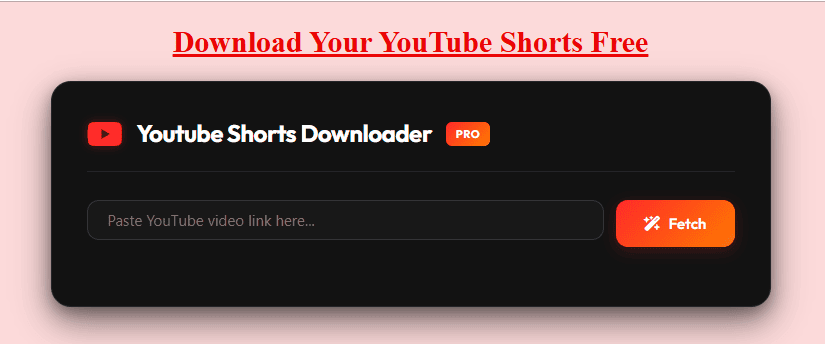
The general workflow is the same across most reliable online tools, including the YouTube Shorts Downloader HD tool on this site:
- Open the YouTube Short you want to save, either in the app or in a browser.
- Tap the Share icon below the video and choose Copy Link. On desktop, you can copy the URL directly from the address bar; it will contain
/shorts/in the path. - Paste that link into the downloader’s input box.
- Let the tool fetch the available formats, then choose your preferred quality (usually up to 1080p, since that is the ceiling for most Shorts source files) and file type (MP4 for video, MP3 if you only want the audio).
- Click download and save the file to your device.
A properly built tool should complete this in under ten seconds for a typical Short, since the files themselves are small. If a link fails, the two most common causes are a private or age-restricted video, or a very recent change to YouTube’s backend that the tool has not yet adjusted to. Waiting a few minutes and trying again usually resolves the second issue.
Downloading Shorts on Android
- Open the YouTube app and find the Short.
- Tap Share > Copy Link.
- Open your mobile browser (Chrome or any Chromium-based browser works) and go to a Shorts downloader site.
- Paste the link, select MP4 and your preferred quality, then tap Download.
- The file saves to your device’s default Downloads folder, from where you can move it into your gallery or share it directly.
No app installation is required for this method, which also avoids the permission requests (contacts, storage, camera access) that some third-party downloader apps ask for unnecessarily.
Downloading Shorts on iPhone or iPad
iOS does not allow browser downloads to save directly into the Photos app the way Android does, so there is one extra step.
- Copy the Shorts link using the Share sheet in the YouTube app.
- Open Safari (or Chrome for iOS) and paste the link into a Shorts downloader.
- Tap Download. iOS will usually prompt you to save the file, which lands in the Files app rather than Photos.
- From the Files app, you can open the video, tap the share icon, and choose Save Video to move it into your Photos library.
Some downloader sites also support a direct “Save to Photos” prompt in Safari, which skips the Files app step entirely.
Downloading Shorts on a PC or Laptop
- Open the Short on youtube.com and copy the URL from the address bar.
- Paste it into the downloader’s input field on your desktop browser.
- Choose your quality and format, then click Download.
- The file lands in your browser’s default Downloads folder, ready to move, edit, or upload elsewhere.
For anyone doing this regularly for archival or research purposes, a general YouTube video downloader works alongside a dedicated Shorts tool, since the same paste-and-download logic applies whether the link is a Short or a standard long-form upload.
Choosing the Right Quality and Format
Most YouTube Shorts downloaders offer two output types: MP4 for the full video with audio, and MP3 if you only want the sound (useful for extracting a trending audio clip or voiceover). On the video side, resolution options typically top out at 1080p because that is the highest quality most creators record and upload Shorts in; a handful of downloaders now support the underlying VP9 or AV1 streams YouTube serves for newer uploads, which preserve more detail during re-editing than the older, more compressed AVC stream. Unless you specifically need the file for professional re-editing, cropping, or zooming, the standard 1080p MP4 option is more than sufficient for offline viewing or casual reposting.
Staying Safe While Downloading
Third-party downloader sites are a common target for aggressive ad networks and fake “Download” buttons, so a few habits go a long way:
- Only click the button that is clearly labeled with your chosen format and file size; ignore large, flashing, or duplicate “Download” buttons elsewhere on the page, as these are almost always ads.
- Avoid tools that ask you to install a browser extension, a “codec pack,” or any executable file just to download a video. A legitimate browser-based Shorts downloader needs nothing beyond your browser.
- Keep an ad blocker active if the site relies on heavy advertising, and never enter personal information, email addresses, or payment details to unlock a basic MP4 download.
- Stick to HTTPS sites. A browser-based tool that runs entirely client-side, without asking for storage permissions or account access, is inherently safer than an app that needs to be installed. Read more in this guide on whether YouTube downloaders are safe to use.
Common Problems and Quick Fixes
The link doesn’t work. Double-check that you copied the full /shorts/ URL and not a shortened or redirected link. Private, deleted, or age-restricted videos cannot be processed by any third-party tool.
The downloaded file has no sound. This usually happens when a tool grabs a video-only stream by mistake. Try re-downloading and confirm you selected an MP4 option rather than a video-only format.
The video plays sideways or in the wrong aspect ratio. This is a sign the tool is not built to handle the vertical Shorts format specifically. Switch to a downloader that explicitly lists Shorts support rather than a generic long-form video tool.
Downloads are slower than expected. Server load and your own connection speed both matter, but a well-built tool should still process a typical Short (under 3 minutes) in a matter of seconds, since the underlying files are small compared to long-form video.
Using Downloaded Shorts Responsibly
Downloading is only half the picture; what you do with the file afterward is what actually matters for staying on the right side of both YouTube’s rules and copyright law. A few practices worth following:
- If you plan to repurpose a downloaded Short for your own channel or social pages, add meaningful value, such as commentary, translation, or an original edit, rather than reposting it unchanged.
- Credit the original creator in your caption whenever you share or reference someone else’s content.
- Keep downloads for personal offline viewing, research into trending formats, or your own archived uploads, and avoid mass re-uploading, which is the exact pattern YouTube’s Content ID and copyright systems are designed to flag.
- If a Short is central to a business or monetized project, reach out to the creator directly. Many are open to collaboration or licensing requests, especially for well-performing content.
Frequently Asked Questions
Can I download YouTube Shorts for free?
Yes. Browser-based Shorts downloaders like the tools on this site are free to use, require no sign-up, and do not add a watermark to the file, since YouTube itself does not watermark downloaded Shorts.
Do I need to install an app to download Shorts?
No. A browser-based downloader works entirely in your mobile or desktop browser. Installing a dedicated app is optional and mainly useful if you download videos very frequently and want batch or scheduling features.
What is the maximum length of a YouTube Short in 2026?
Three minutes (180 seconds), a limit YouTube raised from the original 60 seconds in October 2024. Any vertical or square video under that length is treated as a Short by YouTube’s own systems.
Will the downloaded video include a watermark?
No. Unlike some other short-video platforms, YouTube does not embed a watermark into Shorts, so a clean download reflects the original file exactly as uploaded.
Is it safe to paste a YouTube link into a downloader website?
Generally yes, provided the site does not ask for account logins, personal data, or software installation. A link by itself does not expose personal information; treat it the same way you would any public URL.
Can I download an entire YouTube Shorts playlist or channel at once?
Most Shorts-specific downloaders process one link at a time. For bulk downloading, a general playlist-capable tool is a better fit, since Shorts individually are quick enough to process one by one in most cases.
Why does a private or age-restricted video fail to download?
Third-party tools can only access publicly available streams. Private, deleted, region-restricted, or age-gated videos are blocked at YouTube’s server level and cannot be retrieved by any external tool, official or otherwise.
Final Thoughts
Downloading a YouTube Short is a two-minute task once you understand the format: copy the /shorts/ link, paste it into a tool built specifically for vertical video, choose MP4 or MP3, and save. The bigger decision is how you use what you download. Offline viewing, personal archiving, and studying trends for your own content are all reasonable uses; reposting someone else’s work unchanged is not, regardless of which tool made it easy. If you want the fully sanctioned route with zero ambiguity, YouTube Premium’s built-in download button remains the only method Google officially supports, at a modest monthly cost in India. For everything else, a fast, ad-light, browser-based Shorts downloader gets the job done without installing anything on your device.