If you want to downlaod shorts, you have three realistic routes. YouTube Premium lets you save eligible videos for offline viewing inside the YouTube app. Creators can download videos they uploaded themselves. Link-based tools can also turn a public Short’s link into a file, but YouTube’s Terms of Service do not authorize that route, and some tools carry real safety risks.
This guide explains what each option gives you, how to use it, which video quality to expect, and how to avoid unsafe sites. If you already have permission to keep a Short, you can try the YouTube Shorts downloader on this site and follow the steps below.
What Does It Mean to Downlaod Shorts?
YouTube Shorts are short videos with a vertical or square shape. According to YouTube Help, any video uploaded on or after October 15, 2024 is categorized as a Short when it is square or vertical and runs up to three minutes. Many older guides still say Shorts are limited to 60 seconds. That figure is outdated for newer uploads.
A YouTube Shorts downloader is a website, app, browser extension or desktop program. You give it the link of a Short, and it offers a video file that you can save. When people search for downlaod shorts, they usually mean one of three different things:
- Offline viewing: YouTube stores the video inside its own app, and only the app can play it.
- A standalone file: a normal video file, usually MP4, that you can move, edit or send.
- A bookmark: a saved link that helps you find the Short again, with nothing stored on your device.
Mixing these up causes most of the confusion online. Decide which result you want before you choose a method.
Quick Answer: Which Method Fits Your Goal?
Use this table to pick a route before you downlaod shorts.
| Your goal | Best route | What you get | Main limit |
|---|---|---|---|
| Watch other creators’ Shorts offline | YouTube Premium downloads | An app-only copy | Needs Premium, and not every video is eligible |
| Keep a file of your own Short | YouTube Studio | A video file | Works for videos you uploaded |
| Find a Short again later | A playlist or saved list | A saved link | No offline copy |
| Reuse footage in your own project | Videos marked with a Creative Commons license | Permission to reuse under the license terms | Credit and license terms apply |
| Get a file of a public Short you may keep | A link-based tool | Varies by tool | Outside YouTube’s terms, and safety varies |
Official Ways to Downlaod Shorts
The official ways to downlaod shorts are limited, but they raise no terms-of-service or malware questions. YouTube’s own help pages describe downloads for videos in general, so whether a specific Short shows a Download option depends on your app version, your account and the creator’s settings.
YouTube Premium Offline Downloads
YouTube Help says that if Premium is available in your location, you can download videos on a mobile device. You can also download from a computer in Chrome, Edge, Firefox or Opera. On a computer, the help page gives these steps:
- Visit youtube.com while signed in to your Premium account.
- Open the watch page of the video you want.
- Select Download below the video.
On a phone, open the video in the YouTube app and look for the Download option. This is the main official way to downlaod shorts for offline viewing. The exact label and position can change between app versions, so check the app itself.
Several limits matter:
- App-only copies: YouTube’s offline FAQ says downloaded videos are stored encrypted on the device and can only be watched in the YouTube app. That is why they do not appear in your gallery.
- Expiry: downloaded videos can be played offline for up to 29 days, and in some countries or regions for up to 48 hours. After that, your device must reconnect so the app can check the video.
- No audio files: the same FAQ states that you cannot download audio, music or MP3 files from the YouTube app.
- Quality settings: you can set the default download quality in Settings under Downloads. Higher quality uses more data and storage.
Downloading Your Own Shorts
YouTube’s offline FAQ confirms that you can download videos you have already uploaded. In practice, you open YouTube Studio, go to your content list, find the video, and look in its menu for a download option. Check YouTube’s current help page for the exact steps, because menus change over time.
If you want to downlaod shorts that you published yourself, this is the cleanest route for backing up your own work or reposting it elsewhere, because you already hold the rights. It does not work for other creators’ videos.
Saving a Short Inside YouTube
If you only want to find a Short again, add it to a playlist. This creates no offline copy and uses no storage. The downside is simple: if the creator deletes the Short, it disappears from your list too.
Reusing Shorts Under a Creative Commons License
YouTube allows creators to mark original videos with a Creative Commons CC BY license. According to YouTube Help, the creator keeps the copyright, and other people may reuse the work subject to the license terms. The standard YouTube license remains the default for uploads. If a video is marked CC BY, check the license shown on its page and give credit to the creator.
How to Downlaod Shorts With a Link-Based Tool
A link-based tool is a third-party service that reads the public details of a video and offers files to save. These tools can only reach what any viewer can already open, so private, deleted or restricted videos usually cannot be fetched. Use them only for Shorts you own or have permission to keep.
The process is almost the same on every site:
- Copy the link. In the YouTube app, tap Share, then Copy link. On a computer, copy the address from the browser bar. A Shorts link normally contains /shorts/ followed by the video ID.
- Paste the link into the tool. Open the downloader in your browser, paste the link into the input box, and press the fetch or download button.
- Review the options. If the link can be processed, the tool lists qualities and formats. Pick one that is actually offered.
- Save the file. Approve the browser download, then check your downloads list to confirm the file arrived.
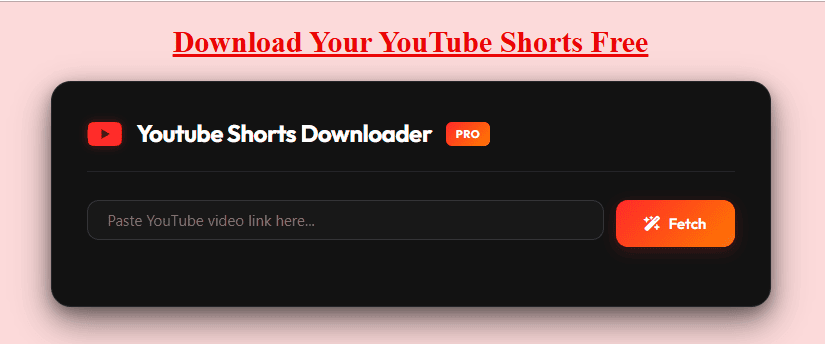
The page for the tool on this site follows that pattern. It shows a Fetch button and a table for quality, format and estimated size. Treat the table as the only truth for any given link, because the options depend on the source video.
How to Downlaod Shorts on Android and iPhone
To downlaod shorts on a phone, copy the link from the YouTube app and open the downloader in your mobile browser. Where the file lands depends on your device and browser settings. On Android, it usually goes to the Downloads folder, and some browsers also add it to the gallery. On iPhone, check the Files app or your browser’s download list first, then save the video to Photos if you want it there.
Avoid installing any app, profile or extension just to complete one download. A genuine link-based tool should work in the browser.
On a Windows PC, Mac or Chromebook
To downlaod shorts on a computer, copy the address of the Short from the address bar, paste it into the tool, and choose a folder you will remember. If you cannot find the file afterward, open the browser’s download list and select the entry to show it in its folder.
Video Quality, Format and File Size
Quality is where many people feel disappointed after they downlaod shorts, so it helps to know what controls it.
The upload sets the ceiling. A tool cannot add detail that the creator’s file does not contain. Some tool pages advertise up to 1080p for Shorts, but treat that as an upper limit, not a promise. Claims of 4K for vertical clips deserve extra suspicion.
MP4 is the safest format. MP4 opens on most phones, computers, televisions and editing programs. Some tools also offer WebM, which a few older players cannot open. If you want maximum compatibility, choose MP4 when it is offered.
Audio-only files need extra care. YouTube’s own app does not let you download audio or MP3 files. Some third-party tools advertise MP3 output, but the soundtrack of a Short is often licensed music or someone else’s voice. Extracting audio does not give you the right to reuse it.
File size follows bitrate and length. You can estimate it with simple arithmetic:
File size in megabytes = bitrate in megabits per second × seconds ÷ 8
As an illustration only, a video at 5 Mbps uses about 37.5 MB per minute. A 60-second Short at that bitrate would be roughly 37.5 MB, and a 3-minute Short would be roughly 112 MB. Real bitrates vary, so your files may be smaller or larger. If you want an official copy that you can control, set the download quality inside the YouTube app. For a deeper look at saving full-length videos as files, see this page on saving videos as MP4 files.
Is It Allowed? YouTube Terms and US Copyright
There are two separate questions: what YouTube allows, and what copyright law allows. Neither answer is a simple yes or no.
What YouTube’s Terms Say
YouTube’s Terms of Service set the rules for anyone who wants to downlaod shorts or any other content. In the version dated December 15, 2023, you may view content for personal, non-commercial use. The terms say you may not download or otherwise use content except as expressly authorized by the service, or with prior written permission from YouTube and, where relevant, the rights holders. They also bar circumventing features that prevent or restrict copying.
In plain language, Premium downloads and downloads of your own uploads are features YouTube provides. A tool run by an outside company is not among them. Using one is a matter between you and YouTube’s terms, and terms can change, so read the current version yourself.
What US Copyright Law Adds
Copyright is a different layer, and it matters before you downlaod shorts for any use beyond private viewing. In the United States, fair use is set out in Section 107 of the Copyright Act. It asks courts to weigh four factors:
- The purpose and character of the use, including whether it is commercial or for nonprofit education.
- The nature of the copyrighted work.
- The amount and substantiality of the portion used.
- The effect of the use on the potential market for the work.
Fair use is decided case by case, so there is no rule that a personal copy is always fine and no rule that it is always infringement. The US Copyright Office also notes that crediting the source does not replace permission. Reposting, remixing or selling someone else’s Short raises a much bigger question than watching a saved copy at home.
This section is general information, not legal advice. If you plan any commercial use, ask the creator for permission or speak with a qualified attorney. For more on safe and lawful ways to keep Shorts, see our guide to legal and safe ways to save YouTube Shorts.
Is It Safe? How to Spot Unsafe Downloader Sites
Many sites that let you downlaod shorts earn money from ads, and some are built to trick visitors. The US Federal Trade Commission warns that scammers often bundle malware with popular free downloads. Its advice includes keeping security software, your browser and your operating system updated, paying attention to browser security warnings, reading each screen during an installation, and declining bundled extras.
Watch for these warning signs:
- The site insists that you install a setup file before it will give you a video.
- It asks for notification permission the moment the page loads.
- It shows a fake “player update” or “codec” message.
- The large Download button opens an unrelated ad page.
- The saved file ends in .exe, .dmg or .apk when you expected a video.
Safer habits:
- Close any new tab that opens by itself, and deny notification prompts.
- Check the file extension before you open anything you downloaded.
- Install apps only from your device’s official store.
- Never enter your Google password, card details or phone number into a downloader site.
- Scan unfamiliar files with your security software.
No page can promise that a tool is risk free. Use judgment every time you try to downlaod shorts from a site you do not know.
Why You Cannot Downlaod Shorts: Troubleshooting
Most failures come from the link, the browser, the network, the downloader itself, the file format, or a restriction on the video. Test one cause at a time. None of these fixes works every time.
| Cause | What you may see | What to try |
|---|---|---|
| Source link | Nothing happens after pasting, or the tool rejects the link | Copy the link again from the Share button. Make sure it points to the Short, not to a channel or a playlist. |
| Restriction on the video | “Video unavailable” | Open the link in a private browser window. If it does not play there, the video may be private, removed, age-restricted or region-limited. |
| Browser | The video plays instead of downloading, or the button does nothing | Try another browser, pause extensions that block scripts, or use the browser’s own download option. |
| Network | Downloads stall or restart | Switch between Wi-Fi and mobile data, or choose a lower resolution. |
| Downloader service | Errors appear for every link | Wait a few minutes and try again, or use a different tool. Sites change when YouTube changes. |
| File format | The file saves but will not play | Try another media player, or choose an MP4 option instead of WebM. |
| Missing sound | Picture without audio | Choose a different option from the list. |
If a Short has no Download button inside the YouTube app, that video is not available for official offline saving in your account. Do not try to bypass that restriction.
How to Choose a Tool Before You Downlaod Shorts
Run through this checklist before you trust any site:
- Clear options: it shows real resolutions and file types for your link instead of vague promises.
- No forced installs or sign-ups: a basic download should not need either.
- Clean behavior: no pop-ups, redirects or notification requests when the page loads.
- Honest limits: it admits that private, removed or restricted videos cannot be fetched.
- Policy pages: you can find a privacy policy, terms and a way to contact the owner.
- Careful claims: be skeptical of wording such as “100% safe” or “works on every video,” which is marketing and not independent proof.
Final Thoughts
The best way to downlaod shorts depends on what you want to do with the result. Use YouTube Premium when you only want to watch offline in the app. Use YouTube Studio when the video is yours. If you choose a link-based tool for a Short you have permission to keep, pick MP4 when it is offered, expect the original upload to set the quality, and stay alert for fake buttons, installers and notification requests. Whenever you downlaod shorts made by someone else, remember that having a file is not the same as having permission. When you are unsure about reusing someone else’s work, ask the creator first, or link to the original Short instead.
For related how-to guides, you can also read our overview of YouTube Shorts saving methods.
Frequently Asked Questions
-
Can I downlaod shorts without installing an app?
Yes. Browser-based tools work on Android, iPhone, Windows and Mac without an app. Copy the Short’s link, paste it into the site, and save a file if an option appears. If a site demands an installer, treat that as a warning sign and leave.
-
Does YouTube let me download Shorts that belong to other creators?
YouTube’s official route for other creators’ videos is Premium offline viewing, which gives you an app-only copy rather than a file. Availability depends on your location, your account and the video. YouTube’s help pages describe downloads for videos in general and do not promise a Download button on every Short.
-
Can I save a Short as an MP3?
YouTube’s app does not offer audio or MP3 downloads. Some third-party tools advertise MP3 output, but the sound in a Short is often copyrighted music or someone else’s voice. Only extract audio you created or have permission to use.
-
How long can a Short be?
A Short can be up to three minutes when the video is square or vertical and was uploaded on or after October 15, 2024. Older guides that say 60 seconds are out of date. Longer clips are treated as regular videos.
-
Is it legal to downlaod shorts in the United States?
There is no single answer. YouTube’s terms do not authorize third-party downloading, and copyright questions, including fair use under Section 107, are decided case by case. Saving your own videos, or videos you have permission to keep, is the lowest-risk approach. Reposting or selling someone else’s Short raises larger issues. This is general information, not legal advice.
-
Why does a downloaded file have no sound or will not play?
Some tools list video-only options or formats that older players cannot open. Go back to the list and choose an option that includes audio, pick MP4 if it is offered, or try a different media player.